
Open Source WordPress CLI
Run WordPress locally.
Deploy anywhere.
Plak CLI is the simplest way to run local WordPress sites and deploy them to any cloud — instant environments, built-in HTTPS, and seamless workflows from your terminal.
curl -fsSL https://plak.sh/install | bashbrew install plakio/tap/plak-cliplak add myblog
Downloading WordPress…
✓ Site ready → https://myblog.localhost
plak login myblog
✓ One-time login: https://myblog.localhost/wp-login?token=a8f…
plak share myblog
Starting Cloudflare tunnel…
✓ Public URL: https://funny-reef-42.trycloudflare.com
plak list
myblog.localhost wp 264 MB
woo.localhost wp 1.2 GB
lms.localhost wp 720 MB
static.localhost static 24 MBFor Agent Users
Claude, Codex, OpenCode, Pi… just paste this.
“Look at https://plak.sh and set up a new WordPress site locally using Plak CLI.”Or install de Plak CLI skill: plak skill install <agent>
The Whole CLI
Short commands. No docs-diving.
SITE MANAGEMENT 8 COMMANDS
plak add <name> [–plain]
Fresh WordPress install at name.localhost. –plain for static.
plak delete <name> [–force]
Tear down the directory and database in one go.
plak rename <old> <new>
Renames the site, its DB, and runs wp search-replace.
plak list [–totals]
Every site Plak manages. –totals adds disk usage.
plak login <site>
Generates a one-time admin login URL. No password juggling.
plak path <name>
Show the local path for a site.
plak url <name>
Show the public URL for a site.
plak log [site] [-f]
Tail error logs. -f follows in real time.
MIGRATION 2 COMMANDS
plak pull [–proxy-uploads]
Pulls a remote WordPress site down via SSH.
plak push
Pushes a local Plak site up to a remote WordPress host.
REMOTE SERVER 4 COMMANDS
plak remote list
List all configured SSH aliases.
plak remote add
Add a new SSH alias interactively.
plak remote connect
Connect to a remote connection by its alias.
plak remote delete
Remove an SSH alias.
HOSTS 3 COMMANDS
plak hosts list
List all local domain entries in /etc/hosts.
plak hosts add
Add a local domain to /etc/hosts with backup.
plak hosts delete
Remove a local domain from /etc/hosts with backup.
SSH KEYS 4 COMMANDS
plak sshkey list
List all SSH keys in ~/.ssh.
plak sshkey view [key-name-or-path]
View details of a specific SSH key.
plak sshkey create
Generate a new SSH key pair interactively.
plak sshkey delete
Remove an SSH key from ~/.ssh.
NETWORK ACCESS 5 COMMANDS
plak share [site]
Cloudflare Tunnel → public URL you can text a client in seconds.
plak lan <enable|disable|status|trust> [site]
Expose sites to your phone via Bonjour/mDNS.
plak tailscale <enable|disable|status>
Every site reachable from any device on your tailnet.
plak wsl-hosts
Print PowerShell snippet to update Windows hosts file.
plak trust
Install local root CA into OS trust store. No more Not Secure.
DATABASE & SERVICES 2 COMMANDS
plak db backup
Snapshots every site’s database to timestamped .sql files.
plak db list
All WordPress DB credentials at a glance.
CONFIGURATION 5 COMMANDS
plak ports [–http PORT] [–https PORT]
Run alongside Local, Studio, or DevKinsta without port fights.
plak memory [set <value>] [–yes]
Audit PHP memory_limit across every ini Plak loads.
plak directive <add|update|delete|list> [site]
Manage Caddy directives per site.
plak proxy <add|list|delete>
Manage reverse proxy mappings.
plak upgrade
Self-update Plak CLI to the latest version.
Dashboard
When the terminal is not handy, open the web dashboard at https://plak.localhost.
Every site at a glance.
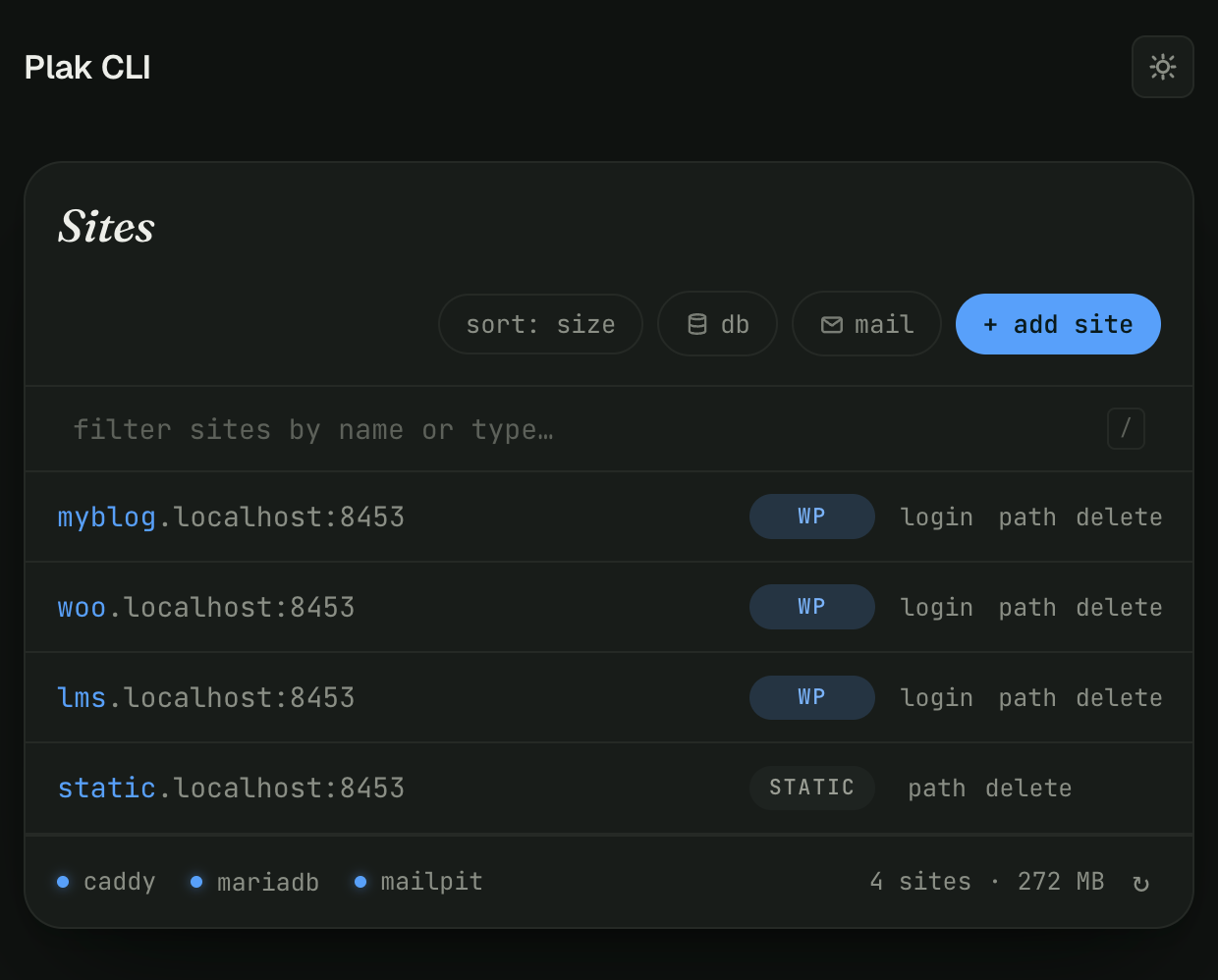
Sites Overview
See all your local WordPress sites, their status, and quick actions. Filter with search, sort by name or size.
One-Click Login
Access any WordPress admin panel with a single click. No password juggling required.
Per-Site Stats
Disk usage, database size, and last modified time for every site you manage.
MANAGE REMOTE WORDPRESS SITES WITHOUT INSTALLING PLAK CLI
Plak CLI Go
Run backups, migrations, diagnostics, and maintenance over SSH.
No Plak CLI install required.
alias _go='curl -sL https://plak.sh/go | bash -s'No global install. No sudo. Agent-friendly.
Plak CLI Go
---------------------

Usage:
  _go <command> [arguments] [--flags]

Available Commands:
  backup              Creates a full backup (files + DB) of a WordPress site.
  migrate             Restores or migrates a site from a backup URL or local file.
  login               Generates a temporary one-click WordPress login URL.
  db                  Performs database operations (backup, check-autoload, optimize).
  find                Runs diagnostics (slow-plugins, malware, hidden-plugins, recent-files).
  convert-to-webp     Converts JPG/PNG images to WebP format.
  dump                Dumps matching file contents into a single text output.
  monitor             Monitors common access/error logs and traffic.
  clean               Removes inactive plugins/themes or analyzes disk usage.
  suspend             Activates or deactivates a visitor-facing suspend message.
  reset               Resets file permissions or the WordPress installation.
  checkpoint          Creates, lists, shows, or reverts file checkpoints with git.
  update              Runs WordPress updates with before/after checkpoints.
  vault               Creates encrypted remote snapshots with restic.
  email               Sends an email through WordPress wp_mail().
  https               Updates WordPress URLs to HTTPS.
  wpcli               Diagnoses WP-CLI warnings.
  zip                 Creates a ZIP archive.
  version             Displays the current version.
Run _go help <command> for command-specific usage.
Premium Support
The best of both worlds. Use it free forever, or upgrade for premium support.
Free
All core features to run and manage local WordPress sites.
- Local WordPress sites
- Built-in HTTPS
- SSH server aliases
- Local domain management
- Database backups
- Web dashboard
- Community support
- Open source (MIT)
Premium
$10
/ month
Additional premium support.
- Everything in Free
- Premium support
FAQ
Plak CLI simplifies WordPress and cloud infrastructure workflows with simple, efficient commands.
Have questions? Feel free to reach out anytime.
What is Plak CLI?
Plak CLI is an open-source developer tool for running WordPress locally and connecting your projects to cloud infrastructure workflows from the terminal.
What is Plak CLI Go?
Plak CLI manages your local WordPress development environment. Plak CLI Go runs portable commands on remote WordPress servers without installation.
Do I need Docker to use Plak CLI?
No. Plak CLI is designed to provide a simpler local development experience without requiring Docker configuration.
Can I use Plak CLI with my own cloud provider?
Yes. Plak CLI supports multicloud workflows and can work with providers like AWS, DigitalOcean, Hetzner, Vultr, and more. For the best experience, we recommend using it together with Plak.
Is Plak CLI free?
Yes. Plak CLI is free and open-source software released under the MIT License.
Contact
Questions about Plak CLI?
We’d love to hear from you.
Stay updated
Product updates. No spam.